




Major Announcements
| When | Communication | Target Audience | Email Subject | Email Content |
|---|---|---|---|---|
| 29 Jun 2026 | Resume the first phase of the transition to Canvas LMS | All Staff | Resumption of Transition to Canvas Learning Management System (LMS) in Semester One 2026/2027 |
Guiding principles: Link |
| 11 May 2026 | Postpone the first phase of the transition to Canvas LMS | All Staff and Students | Important Announcement: Update on Canvas LMS Transition | Link |
| 4 May 2026 | Soft Launch Announcement | All Staff | Soft Launch of Canvas@PolyU Learning Management System (LMS) on 4 May 2026 | Link |
| 8 Apr 2026 | Briefing Session for All Staff | All Staff | Invitation to Join Briefing Session for Canvas LMS Transition | Link |
| 26 Mar 2026 | Teaser Email | All Students | Strategic Adoption of Canvas Learning Management System (LMS) | Link |
| 26 Mar 2026 | Teaser Email | All Staff | Strategic Adoption of Canvas Learning Management System (LMS) |
Link |
| 24 Mar 2026 | Teaser Email | Department Heads and DLTC Chairs |
Strategic Adoption of Canvas Learning Management System (LMS) | Link |
Briefing / Training
| When | Topic | Target Audience | Materials | Recordings |
|---|---|---|---|---|
| Apr to May 2026 | Prepare course content for Canvas | All Staff |
Link | Cantonese:
Link
English: Link |
| Apr to May 2026 | Canvas Basic for Instructors | All Staff | Link | Cantonese:
Link
English: Link |
| 15 Apr 2026 | Briefing Session for Canvas LMS Transition | All Staff |
Link | Link |
30 Mar 2026 31 Mar 2026 |
Canvas LMS Briefing Session for CLOs | All CLOs | Import Blackboard Content to Canvas: Link Canvas Basic for Instructor: Link |
FAQ
Background
- Why are we moving from Blackboard to Canvas?
Canvas provides faculty with more intuitive tools like SpeedGrader to reduce grading time. These efficiency gains allow you to focus more on teaching and less on managing the technology. Your students will also benefit from a modern, mobile-friendly interface that remains consistent across all their university courses.
- How was the decision made to choose Canvas?
The selection of Canvas LMS followed a year-long evaluation process involving rigorous analysis, benchmarking against pedagogic and technical criteria, and comprehensive teacher and student feedback.
- Is the move to Canvas mandatory for all faculties, schools and departments?
Yes. To provide a consistent and seamless teaching and learning experience for our teachers and students, the University has committed to a single LMS.
- Are research postgraduate students (e.g. MPhil, PhD) required to transition to Canvas?
Yes. All students, including Research Postgraduates, will transition to Canvas for any subjects previously hosted on Blackboard. Starting from Semester One 2026/27, Canvas LMS will be the primary LMS.
Logistics & Timeline
- When do I need to switch to Canvas?
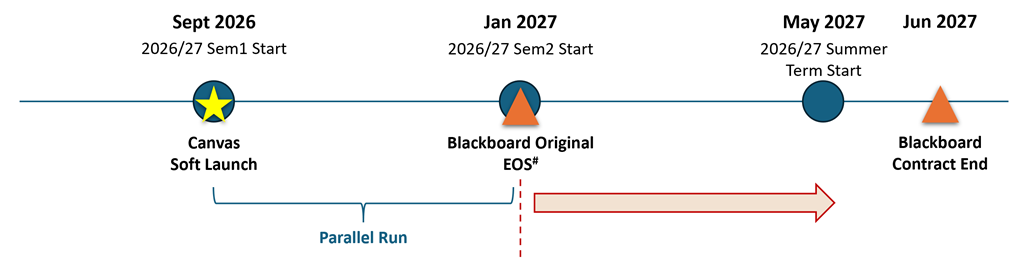
The transition begins from Semester One 2026/27, followed by the official university-wide rollout in Semester Two 2026/27.To take full advantage of its modern features and enhance student learning, we strongly encourage you to adopt the new LMS as early as possible. If you would like to use Canvas for your subjects in Semester One 2026/27 (if applicable), please express your interest to your department which will coordinate the subject list to be submitted to ITS in July 2026.
-
What happens to my subjects using Blackboard Original Course View after 31 December 2026?
All subjects will become read-only.
-
When is the absolute deadline to stop using Blackboard Original Course View in teaching?
31 December 2026.
- I don’t have a course in Semester One 2026/27. Is there a problem to switch later?
Our phased transition approach is flexible, allowing you to move in Semester Two of 2026/27. However, we encourage early adoption where possible. To help you prepare, ITS will provide training workshops on Canvas. Every teacher has a private 'Sandbox' environment—a pressure-free space to explore the system at your own pace. Additionally, you may acquire relevant transition experience from your departmental peers.
- Can I teach one course in Canvas and one in Blackboard during the transition?
While technically possible, we strongly discourage this to avoid your burden on operating two systems.
Setup and Tools
- How do I set up my subject in Canvas?
To prepare your subject for Canvas, you can choose between two approaches:
To ensure your course is optimised for Canvas-native features and provide a better experience for your students, we recommend Approach 1. For the detailed steps of both approaches, you can refer to this page.Approach 1: Direct Course Creation (Recommended)
This involves building your course modules and activities directly within Canvas using its intuitive "drag-and-drop" tools.Approach 2: Content Migration
This involves exporting your existing materials from Blackboard and importing them into Canvas course shell.
- Is there a "Student View" to test my course?
Yes. Canvas features a prominent "Student View" button on every page, allowing you to instantly see exactly what your students see and test assignments/quizzes.
- Is there a mobile App for teachers?
Yes. The "Canvas Teacher" app is available for free on the Apple App Store and Google Play (search for “Canvas Teacher”). Once downloaded, search for The Hong Kong Polytechnic University to log in. The app allows you to grade, give feedback and manage your classes from anywhere.
- Will Turnitin, Zoom and Panopto still work?
Yes. They are fully integrated with Canvas.
- Can I reuse my Canvas course next year?
Once a course is built in Canvas, you can use the course import tool feature to move everything to a new semester in seconds.
- What happens to my Blackboard materials after the contract ends in June 2027?
Access to Blackboard will end in June 2027. While ITS will perform a final, one-time archive of all materials in May 2027, any content uploaded after that date will not be captured.
Teachers are strongly reminded to back up all course materials locally (e.g., to a personal drive or OneDrive) before June 2027 to ensure you maintain permanent access to your files and records. ITS will provide a step-by-step user guide on how to do this in due course.
Training & Support
- What training is available for me?
ITS offers hybrid trainings (classroom and virtual) to teachers. Enrollment information will be sent to teachers around one month before the start of Semester One and Two 2026/27. Training will be recorded and the videos will be uploaded to the self-service portal for teachers’ access. If you would like to have hands-on exercise on Canvas, you are encouraged to join the classroom training.
- What are the support channels if I have questions about the transition or Canvas in general?
There is a tiered support system to ensure your needs are well catered:
- Self-service portal – all training videos and user guides are uploaded to this site for you to access anytime
- CLOs from your department – they will receive training by ITS who serve as the local subject matter experts to provide you immediate in-person assistance
- Central ITS support – If you encounter some technical issues, you can contact ITS HelpCentre for assistance via
- Online ServiceDesk
- Hotline: 2766-5900
- WhatsApp / WeChat (text message only): 6577-9669
Background
- Why are we moving from Blackboard to Canvas?
We are moving to Canvas to provide you with a more modern, reliable, and mobile-friendly learning experience. Canvas is much easier to navigate and offers a top-rated mobile app that helps you stay on top of your assignments and grades from anywhere.
- When will I start using Canvas for my classes?
The transition will happen in 2 phases:
2026/27 Semester One: Selected subjects will move to Canvas. During this period, you may have some classes on Canvas and others still on Blackboard. Please refer to your teacher’s guidance for each specific subject.
2026/27 Semester Two: All university subjects will be fully transitioned to Canvas.
- Is there a mobile App for Canvas?
Yes! The "Canvas Student" app is available for free on the Apple App Store and Google Play (search for “Canvas by Instructure”). Once downloaded, search for “The Hong Kong Polytechnic University” to log in. The app allows you to submit assignments, participate in discussions, and receive instant push notifications for grades and announcements.
- Where can I get help if I don’t know how to use Canvas?
There is a tiered support system to ensure your needs are well catered:
- Self-service portal – all training videos and user guides are uploaded to this site for you to access anytime
- Central ITS support – If you encounter some technical issues, you can contact ITS HelpCentre for assistance via
- Online ServiceDesk
- Hotline: 2766-5900
- WhatsApp / WeChat (text message only): 6577-9669
- What happens to my old grades and assignments on Blackboard?
You will continue to have access to Blackboard until June 2027. We strongly recommend downloading any important assignments, feedback, or grade reports you wish to keep for your records before the June 2027 deadline.
